Built for social media managers

Run Facebook group campaigns for every client from one tool.

Your clients can't afford a $250/mo Hootsuite seat. You can't afford to spend Friday night posting the same campaign into 40 groups by hand. Grovo gives you a per-client list, AI-rewritten copy, and one-click posting for less than the price of one client coffee.

$15
a month
5+
clients per seat
1/10
price of Hootsuite
$0
to start
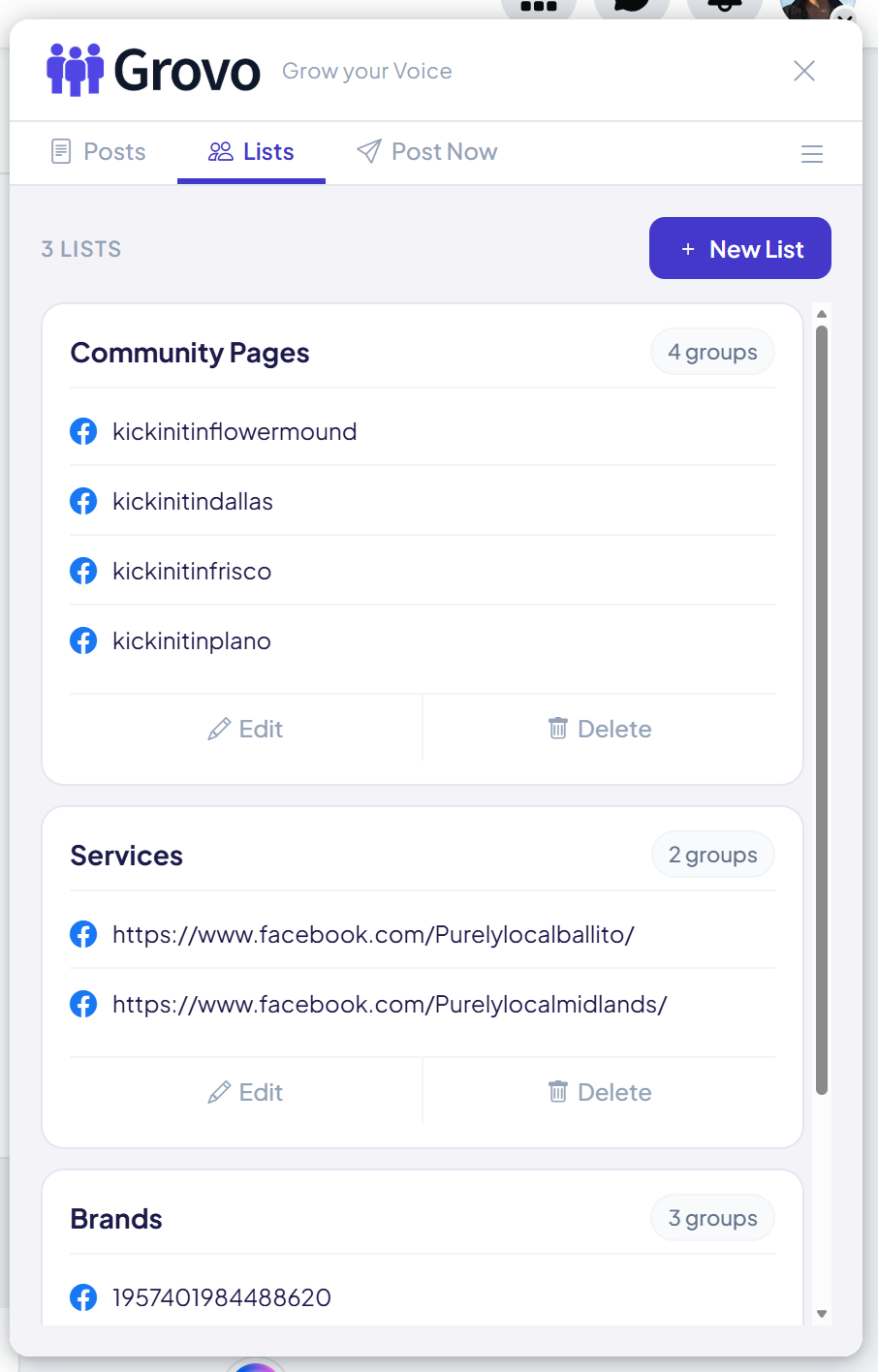
Grovo Lists tab showing multiple per-client Facebook group lists organized for easy reuse
Sound familiar?

You're a strategist, not a copy-paste machine

The big tools price you out. The cheap tools can't post into groups. So your evenings disappear into the same manual loop, client after client.

💸

Client budgets won't stretch

You quote Hootsuite Teams at $99 a seat and the client laughs. So you eat the cost or post manually. Either way, your margin shrinks.

🔀

Five clients, five tabs, five mistakes

Switching between client accounts means logged-in mix-ups, wrong group lists, and the occasional "oh no" post. The bigger your roster, the higher the risk.

Friday nights belong to the agency

By the time you've posted the same campaign to 40 community groups across all your clients, the weekend is over. And Monday's content calendar is still empty.

How Grovo works for SMMs

One tool. Every client. Every campaign.

Set up a list per client, write the campaign once, let AI variations make every post unique. Your Friday night is yours again.

1

One list per client

Build a Facebook group list for each client and label it clearly. "Acme Yoga Studios". "Hudson Pet Grooming". "Brooklyn Coffee Co." Reuse the list on every campaign you run for that client.

2

Write once, post forever

Save your client's campaign post inside Grovo with their copy, images, and call to action. Reuse it across multiple group runs without rebuilding it from scratch each time.

3

AI rewrites for variety

Click Generate. Claude writes ten variations of every campaign post, same offer, fresh wording. Each group sees a different version so no client looks like they're spamming.

4

Click Start. Move on.

Switch into the right client's Facebook session, run the campaign, and Grovo posts to every group on the list while you draft the next client's brief or actually take Saturday off.

The unfair advantage

Every client looks like they wrote each post by hand

You write the campaign once. Grovo's AI makes ten unique versions. Each group sees a different one. No client gets flagged for duplicate content. No two groups see the same words.

  • Same offer, photos, and call to action
  • Different wording in every group
  • You approve every version per client
  • Edit any rewrite to match the client's voice
Client's campaign post
Spring class pass: 5 yoga sessions for $49 (usually $85). New students only. Use code SPRING at acmeyoga.com. Limited spots, sign up by Friday.
Sample AI variations
New here? Try us out: 5 yoga classes for $49 (a $36 saving on our usual $85). Code SPRING at acmeyoga.com. Spots are limited so grab one before Friday.
Spring intro pack is live: five yoga sessions for $49 instead of the usual $85, just for new students. Apply code SPRING at acmeyoga.com. Closes Friday.
5 sessions, $49, brand new students only. That's our spring deal at acmeyoga.com (use code SPRING). Friday is the cutoff and seats are filling.
Pricing

$14.99 covers every client you run

No per-client seat tax. No tiered pricing trap. One Pro account handles all your client lists, every campaign, every month.

Free
$0
No credit card
  • 3 free posting sessions
  • Up to 6 groups per list
  • Manual posting only
Get started free
Best value
Yearly
$149
$12.42/mo, save 17%
  • Unlimited posting sessions
  • Unlimited groups per list
  • Unlimited client lists
  • AI post variations included
  • Priority email support
Start with yearly
Monthly
$14.99
per month
  • Unlimited posting sessions
  • Unlimited groups per list
  • Unlimited client lists
  • AI post variations included
Start monthly
Common questions

FAQ for social media managers

How does Grovo handle multiple client Facebook accounts?
Grovo runs in your browser session. To post for a client, sign into Facebook as that client (or in a separate Chrome profile per client, which is what most agencies do), then run the campaign in Grovo. Each client's lists, posts, and AI variations stay organized inside Grovo so nothing crosses between accounts.
Can I bill clients for Grovo as a software cost?
Yes. At $14.99/month total it's small enough most agencies absorb it. Some pass it through as a flat $25-50/mo "tools and software" line on each retainer. Either way you're at a tiny fraction of what Hootsuite Teams or Sprout would cost per client.
Will my clients' accounts get flagged?
Grovo paces posts naturally (default 45 seconds between groups) and uses AI to make every post unique. That's the opposite of what spam detectors look for. Stick to groups where the client is an established member and where the rules allow promotional posts and you significantly reduce the risk.
Can I white-label this for client reporting?
Grovo doesn't add branding to client posts. The post history view is internal so you can screenshot it for client reports. There's no Grovo logo on anything your client sees.
Why not just use Buffer or Hootsuite?
Buffer, Hootsuite, and Sprout post to Facebook Pages and personal timelines. They cannot post into Facebook groups, which are a separate API surface unsupported by the big platforms. Grovo is purpose-built for groups, where most local-business reach actually lives.
What if a client cancels mid-month?
No problem. Your Grovo Pro account stays active for all your other clients. Just delete that client's lists when you offboard them. No per-client billing means no proration headaches.
Do you offer a refund?
Yes. 14-day money-back guarantee on Pro plans. Try it across two client campaigns. If it doesn't save you billable hours, email support@grovo.io and we refund.

Get your Friday nights back

3 free posting sessions. No credit card. Install in 30 seconds and run your next client campaign tonight.

Add to Chrome - Free